
Note: Please download the corresponding firmware file from ToolkitRC website according to the product model and version.
1.Use the corresponding cable according to the product interface;
2.Connect the computer and charger;
3.Unzip the downloaded upgrade file;
4.Copy the file [app.upga];
5.Paste the file to the disk named [Toolkit];
6.Removing the removable drive, disconnecting the charger.
Manual calibration procedure is as follows:
●When the charger is switched off, press and hold the scroll wheel, and power on the input. When the charger is switched on, it will enter the calibration page.
●Connect a fully charged battery to the output terminal, and manually calibrate each voltage value on the calibration page to the actual value. The actual values are measured with a multimeter.
●Save, exit and reboot.
●Before connecting to the power supply, press and hold the [Type/Current key], and then turn on the power, and enter into the calibration page. As shown in the figure below.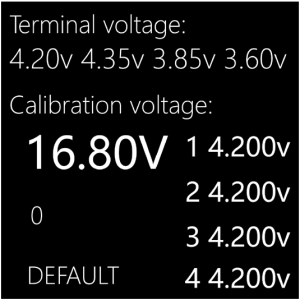
●Connect a fully charged battery to the output, and manually calibrate each voltage value on the calibration page to the actual value. The actual values are measured with a multimeter. The calibration is done.